
I’ve spent the last couple of posts trying to get autoscaling knowledge out of my
head and onto the page — the ComputeClasses primer,
then the curate-or-auto-create follow-up.
And every time I finish one, I run into the same wall: a blog post is something you
read. It sits there. The person who actually needs it is three Slack threads deep
at 11pm with pods stuck Pending, and they are not going to stop and read a primer.
What they have open instead is an agent. So the question I kept circling is: can I put this expertise where the work happens — in the terminal, in context, applied rather than recited? That’s exactly what an agent skill is for. A skill is a folder of focused instructions, reference docs, and runnable scripts that an agent like Claude pulls in only when the task calls for it. The model already knows Kubernetes in the abstract; the skill gives it the GKE-specific patterns, the gotchas that bite, and the tools to reach for — so it does the right thing instead of confidently doing a plausible wrong thing.
I packaged the autoscaling material into two of them. They’re experimental, they live in a personal repo (not an official Google one), and you can install them today. Here’s what they do and why I split them the way I did.
Two skills, one autoscaling story#
Autoscaling on GKE is really two jobs. There’s design — deciding what capacity you’re willing to run, in what order, at what price — and there’s operations — figuring out why the thing you designed isn’t behaving. I gave each its own skill, because an agent reaching for “how do I write a ComputeClass” wants a different body of knowledge than one reaching for “why won’t this node pool scale down.”
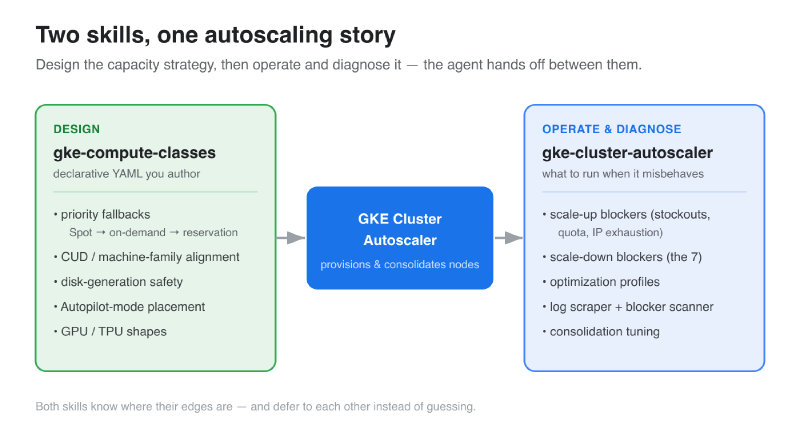
gke-compute-classesis the declarative half. It knows the ComputeClass CRD cold: priority fallbacks, cost optimization, disk-generation traps, GPU and TPU shapes, Autopilot-mode placement. When you ask for YAML, this is what answers.gke-cluster-autoscaleris the operational half. Scale-up blockers, scale-down blockers, optimization profiles, consolidation tuning — and the troubleshooting scripts I’ll get to below.
The nice part is they know their own edges. Ask the autoscaler skill for a ComputeClass spec and it defers to the ComputeClasses skill instead of hallucinating fields. That handoff is the whole point: each skill stays sharp on its lane.
Expert guidance, not generic advice#
The reason a skill beats “the model already knows Kubernetes” is specificity — the right ComputeClass depends on the workload’s shape, and the skills carry dozens of those patterns across serving, batch, stateful, GPU/TPU, cost, and HA. Here’s the design skill authoring one for Redis — CUD-aligned machine family, tuned sysctls, generation-matched fallback — without being told the rules:
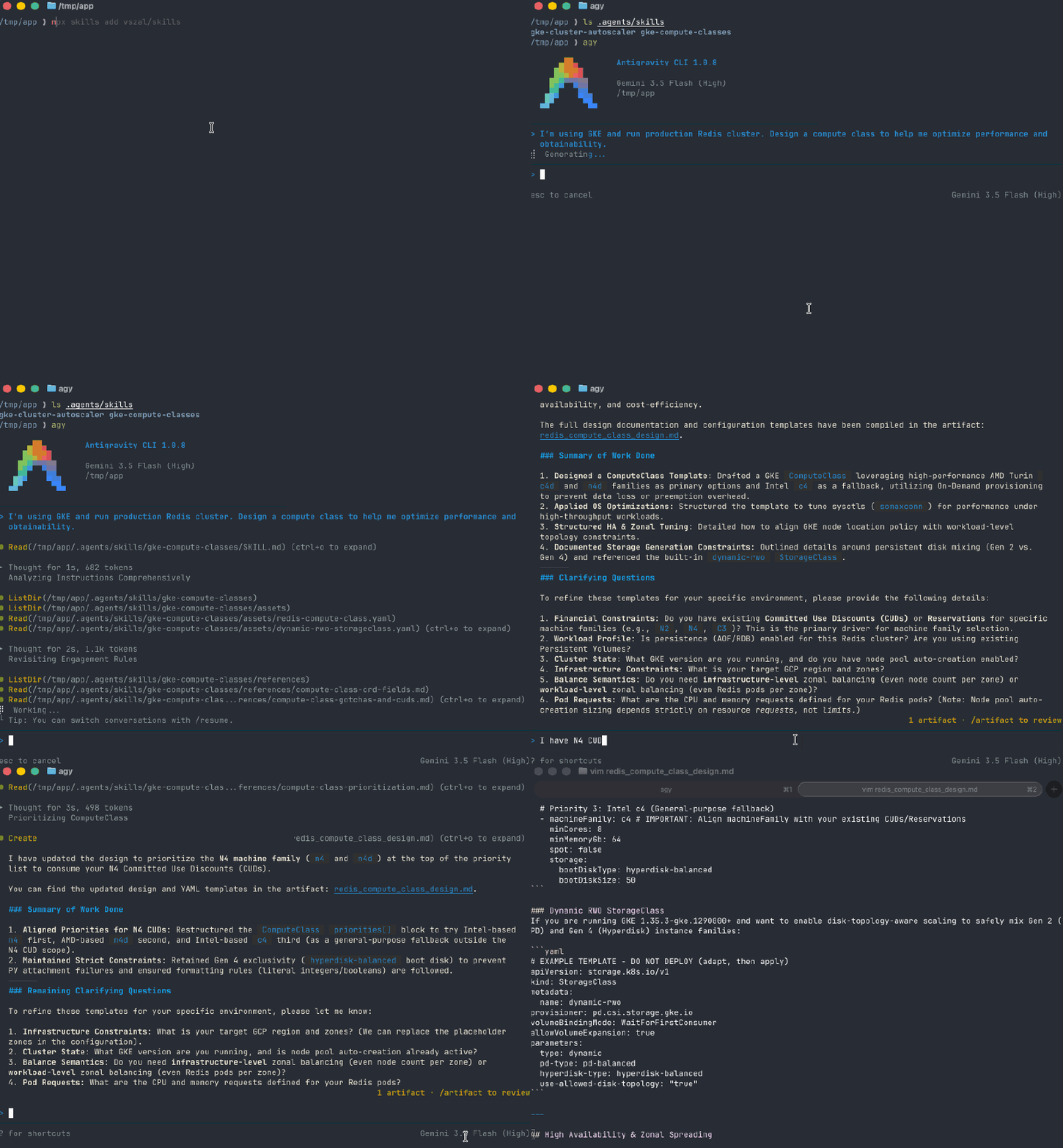
A few of the patterns behind output like that, just for the flavor:
- Stateful workloads pin to a zone and a disk generation. A database node has to
land in its PersistentVolume’s zone, and the family dictates the disk — Gen-4 (
c4,n4) needs Hyperdisk, Gen-2 (n2) needs Persistent Disk; mix them in one fallback list and PV attach breaks. (On GKE 1.35.3+ thedynamic-rwoStorageClass makes the autoscaler disk-aware so you can widen across generations — the skill knows the gate.) - “Balanced” is two different things.
location.locationPolicy: BALANCEDspreads nodes across zones; a workloadtopologySpreadConstraintwithwhenUnsatisfiable: DoNotSchedulespreads pods. They’re independent — balanced nodes can still leave every replica in one zone — so real zonal HA means both. - AI inference is a ladder ranked by obtainability, not price. Accelerators are
scarce and slow to warm, so a serving class goes reservation → Spot → DWS FlexStart
→ on-demand floor, and the pods need an
nvidia.com/gputoleration or they sitPendingnext to a perfectly good node.
The throughline: the right answer bends to the workload, and the skill carries that judgment so the agent doesn’t rediscover it each time.
The gotchas it’s there to stop#
If best-practice patterns are the upside, gotchas are the reason a skill earns its keep. These are the traps where a generic answer is confidently wrong — it looks right, it applies clean, and it fails an hour later. The skills encode a long list of them; here are three representative ones, just to show the kind of thing they catch:
AnyBestEffortsilently bypasses your priorities. Set that reservation affinity and GCE quietly falls back to on-demand below the ComputeClass — your carefully ordered Spot fallback never fires. The fix isSpecificwith named reservations, and the skill won’t reach forAnyBestEffortby reflex.- A brand-new reservation makes the autoscaler stall. Target a reservation within ~30 minutes of creating it and the autoscaler — working from cached reservation data — can’t see the capacity yet, backs off, and your pods hang. Nothing’s misconfigured; you just have to wait it out. The skill tells you that instead of sending you down a rabbit hole.
- DaemonSets do not block scale-down. This one’s folklore — people blame the
DaemonSet when the real blocker is a bare pod, a
safe-to-evict: "false"annotation, or a tight PodDisruptionBudget. The skill enumerates the actual causes instead of guessing.
That last theme — name the real cause, don’t guess — is exactly where the tools come in.
The tools: a log scraper and a blocker scanner#
Here’s the part I’m most happy with. Both skills ship runnable scripts, so the agent doesn’t just talk about diagnosis — it actually runs the diagnosis.
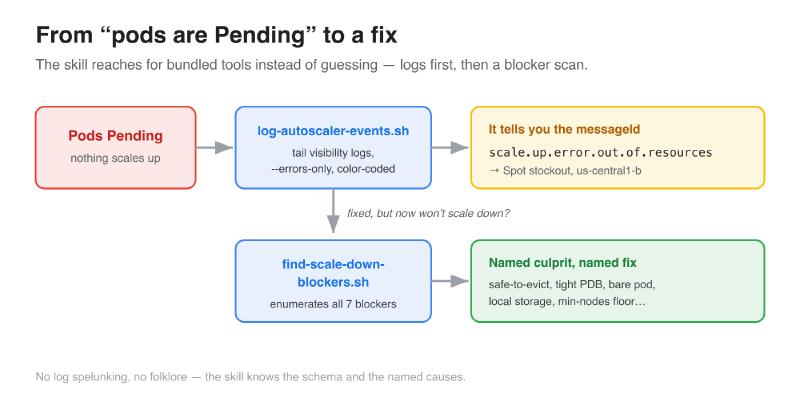
log-autoscaler-events.sh is the log scraper. GKE’s cluster-autoscaler
visibility logs are rich but miserable to read by hand — deeply nested JSON in Cloud
Logging. This script tails them, color-codes scale-ups, scale-downs, node-pool
creations, and errors, and --errors-only strips it down to just what’s failing. It
surfaces the messageId — scale.up.error.out.of.resources,
scale.up.error.quota.exceeded, and friends — which is the single most useful piece
of information for a diagnosis and the thing people never know to look for.
./log-autoscaler-events.sh --errors-only my-cluster
# ⚠ noScaleUp  scale.up.error.out.of.resources
#             pool: cc-spot-n4 · zone: us-central1-b
find-scale-down-blockers.sh is the other half. When nodes won’t consolidate,
it scans the whole cluster and enumerates every one of the blockers —
safe-to-evict: "false", bare pods, local-storage pods, PDBs at
disruptionsAllowed: 0, hostname affinity, non-DaemonSet kube-system pods, and
node pools already at their min-nodes floor — and tells you exactly which pod on
which node is the culprit. No spelunking, no folklore.
What it looks like in practice#
Put it together and a multi-turn session looks like this — pending pods in, named fix out, with the agent running the bundled tools in between:
That’s the whole pitch in one loop. The user never had to know that visibility logs
exist, or that scale.up.error.out.of.resources means a Spot stockout, or that a
disruptionsAllowed: 0 PDB is what’s pinning their nodes. The skill knew where to
look, which tool to run, and what the output meant.
Try it#
The skills live at github.com/vszal/skills —
experimental, under active development, and explicitly not an official Google repo
(for production guidance, prefer google/skills).
Install with:
npx skills add vszal/skillsPick gke-compute-classes and gke-cluster-autoscaler from the list (there’s a
gke-storage one too, if that’s your problem of the week). Then just ask your agent
the question you’d otherwise have Googled — “my pods are Pending and nothing’s
scaling up” — and watch it reach for the right tool instead of guessing.
That’s the shift I keep coming back to. A blog post is expertise you have to go read. A skill is expertise the agent applies for you, at the terminal, the moment you need it. I’d rather ship the second kind.
Update (2026-06-23): The gke-compute-classes skill has been promoted to the
official Google skills repository. You can now install it from
skills.sh/google/skills/gke-compute-classes.