Part 1 of a 3-part series on porting EKS/Karpenter autoscaling patterns to GKE. Part 2 covers instance diversity and disruption control; Part 3 covers accelerators, reservations, and tenant isolation.
I’ll be honest up front: I’m not a Karpenter expert. My side of this is GKE — I’m the product manager for ComputeClasses at Google Cloud, so I know that model cold and I’m the first to admit I see the AWS side through the eyes of the multi-cloud teams bringing Karpenter patterns with them. And I spend a lot of time with those teams extending their footprint to GKE alongside EKS, where the same question comes up every time — “what’s my Karpenter here?” They’ve internalized a particular way of asking for compute on AWS, and they want the GKE equivalent for their second cloud, ideally without relearning autoscaling from scratch.
The short answer is ComputeClasses, and the mapping is cleaner than you’d expect. But there’s one conceptual shift to make first, and if you make it early the rest is mostly a translation exercise. This post is that shift, plus the two lookup tables we hand teams porting their provisioning patterns to GKE, plus one fully worked example — the cost-optimized Spot setup that’s probably 80% of why you picked Karpenter in the first place.
Two ways to say “give me nodes”#
Here’s the shift, and I want to be straight about it rather than pretend the two tools are identical.
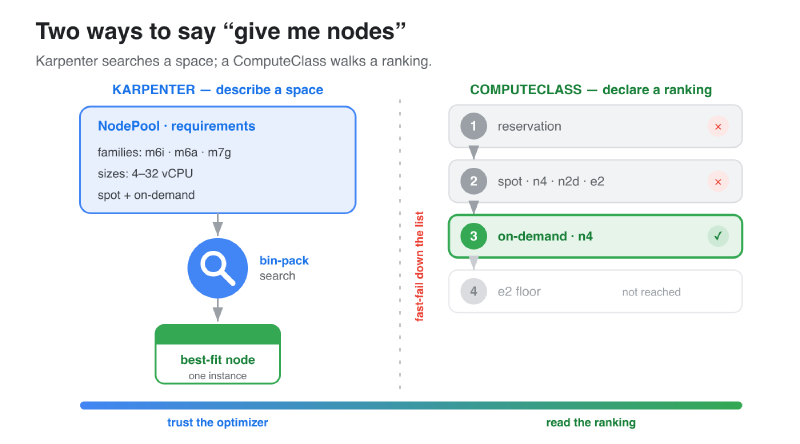
Karpenter asks you to describe a space. You hand a NodePool a broad
requirements block — a family of instance types, a range of sizes, one or more
capacity types — and Karpenter’s solver bin-packs your pending pods onto whatever
instance it computes as the best fit right now. The expressiveness is the whole
point: describe the feasible region, trust the optimizer to search it.
A ComputeClass asks you to declare a ranking. Instead of a space to search,
you write an ordered list of priorities[] — a ranked expression of the tradeoffs
you actually care about (reservation before on-demand before Spot; this family
before that one; this zone policy). GKE’s autoscaler walks the list top-to-bottom
and fast-fails to the next tier the moment one is unobtainable.
That’s a real design difference, not a marketing gloss — and it’s the one we made deliberately when we built ComputeClasses. You’re trading a solver’s search for an author’s ranking. Two properties fall out of that choice that I’d argue for even if I hadn’t helped design it:
- It’s deterministic and auditable. You read the YAML and you know exactly what the autoscaler will try, and in what order. There’s no “why on earth did it pick that instance?” forensics after the fact — the answer is always “because it was the highest priority that was obtainable.” For a platform team defending a cloud bill, that legibility is the whole point, and it’s what we optimized the model for.
- You still get flexibility — you just scope it per tier. A priority doesn’t
have to name an exact SKU. Intent-based priorities (
machineFamily: n4plusminCores: 16, mixed architectures,locationPolicy: ANY) let GKE find the best-fit shape within that tier. So it isn’t “enumerate the whole catalog”; it’s “describe each tier by intent, then rank the tiers.”
The honest tradeoff: Karpenter’s In [a-long-list-of-instance-types] has no literal
one-to-one. Collapsing that list into a short ranked set of intent-based priorities
is the porting skill. Do it well and you keep almost all the flexibility while
gaining a decision path you can actually reason about.
There’s a second thing people rightly value about Karpenter that I don’t want to gloss over: it’s open source, it’s a CNCF project, and that portability is part of the appeal. So the fair question is whether adopting ComputeClasses signs you up for GKE lock-in. I want to meet that head-on, because it’s a concern I hear a lot and one I take seriously in how we’re steering this. The short version — and I’ll come back to it properly in Part 3 — is that the direction of travel points the other way. At KubeCon EU 2026, Google announced it will open-source GKE Cluster Autoscaler, “one of the core components driving infrastructure provisioning,” with the explicit goal of “a vendor-neutral platform that the OSS community can benefit from and build on top of.” And the ComputeClass model is coming with it: Google intends to open-source ComputeClasses too — I’m driving that effort, and I’ll cover the details in Part 3. The upshot is that the API you’d standardize on here is heading toward vendor-neutral, not away from it. If parity with the Karpenter you’re still running on EKS is what’s making you hesitate to invest in learning ComputeClasses, hold that thought.
The concept mapping#
Most Karpenter concepts have a direct GKE home. This is the table I keep open:
| Karpenter | GKE ComputeClass | Note |
|---|---|---|
NodePool | ComputeClass | Collapse multiple NodePools into one ranked priorities[]. |
spec.weight | Order in priorities[] | Top wins; strictly ordered traversal. |
requirements: instance-family In [...] | machineFamily: per priority | One family per priority; vary across priorities. |
capacity-type: spot | spot: true | Declared per priority. |
consolidateAfter: 30s | consolidationDelayMinutes: 1 | Floor is 1 minute. |
drift | activeMigration: { optimizeRulePriority: true } | Honors PodDisruptionBudgets. |
disruption.budgets | WorkloadClass (or PDBs) | More on this in Part 2 — it’s the interesting one. |
That last row is the one worth flagging now, because it reflects a deliberate design
stance. Karpenter bundles infra provisioning and workload disruption control into a
single NodePool. On GKE we keep them separate: the ComputeClass decides where a
workload runs, and a distinct, newer API — WorkloadClass
— decides when it may be disrupted (maintenance windows, a minimum run duration
before eviction is allowed, allowlisted disruption sources). Disruption tolerance is a
property of the workload, not the infrastructure, so it belongs on the workload —
and keeping ComputeClasses focused purely on provisioning is a big part of why the
ranking model stays as legible as it does. I’ll dig into that in Part 2; just know the
row exists.
Translating instance families#
The other lookup table is hardware. GCP doesn’t have m6i, but it has a close cousin
for every AWS class you’re likely running. The one thing to get right is the vendor
axis — matching Intel-to-Intel and AMD-to-AMD keeps you aligned with any committed-use
discounts you’re carrying over — and the generation axis, since GCP, like AWS, ships a
current generation alongside a still-supported prior one.
| AWS class | GCP current-gen (→ prior-gen) |
|---|---|
General purpose — m6i/m7i (Intel), m6a/m7a (AMD), m7g (Graviton) | n4 Intel · n4d AMD · n4a/c4a Axion Arm — (prior gen: n2/n2d) |
Performance / compute-leaning — c6i/c7i, c6a/c7a, c7g | c4 Intel · c4d AMD · c4a Arm — (prior gen: c3/c3d) |
HPC / compute-optimized — c5, hpc6a | c2 / c2d, and h3 for tightly-coupled HPC |
Burstable / cost-optimized — t3 / t4g | e2 — the largest, cost-optimized (oversubscribed) general pool |
Memory-optimized ~8 GB/vCPU — r6i / r7i | the -highmem variants of n4 / c4 |
Extreme memory, SAP HANA class — x2, u-* | m4 (→ m3 / x4) — the memory-optimized M-series |
Two of those rows trip people up, so they’re worth calling out:
e2is the cost pool, not a peer ofn4. It has a predefined CPU (Intel or AMD, chosen for you) and is oversubscribed — it’s the biggest, cheapest, most broadly available general pool, which makes it an excellent On-Demand availability floor, but it’s not the shape you reach for when you want dedicated, current-gen performance. That’sn4/n4d(orc4/c4dwhen you want more sustained throughput).- Memory-optimized splits in two. For ordinary memory-heavy workloads (the AWS
r-series, ~8 GB/vCPU), stay on general-purpose and use the-highmemshapes ofn4/c4. Reserve the true memory-optimized M-series (m4,m3,x4) for extreme ratios — the SAP HANA / large in-memory-database tier.
A couple of behavioral notes that also bite people coming from AWS:
- Spot and On-Demand often share capacity for CPU on GCP. If On-Demand for a
family is out in a zone, Spot for that family is frequently out too. So a
Spot-only ComputeClass with no On-Demand floor can strand pods. Always end with
an On-Demand floor — and
e2is a strong choice for it, precisely because it’s the largest pool. (Accelerators behave differently — Spot GPUs are often available when On-Demand isn’t — but that’s a Part 3 topic.) - Topology spread lives on the Pod, not the ComputeClass. Karpenter reads
topologySpreadConstraintsas part of its solve; on GKE you set them on the workload and the autoscaler respects them. Don’t go looking for a zone-spread knob in the ComputeClass spec.
A worked example: cost-optimized Spot with an On-Demand floor#
Here’s the canonical Karpenter setup — one NodePool, capacity-type In [spot, on-demand], a wide instance-family list, consolidation on — and its ComputeClass
translation. This is the pattern most teams want first.
apiVersion: cloud.google.com/v1
kind: ComputeClass
metadata:
  name: spot-cost-tiebreak-usc1
spec:
  nodePoolAutoCreation:
    enabled: true
  autoscalingPolicy:
    consolidationDelayMinutes: 2
    consolidationThreshold: 50
  priorityDefaults:
    location:
      zones: ['us-central1-a', 'us-central1-b', 'us-central1-c', 'us-central1-f']
      locationPolicy: ANY
  priorities:
  # Top tier: three interchangeable Spot families at the SAME score. The
  # autoscaler picks whichever is cheapest AND available right now.
  - machineFamily: e2
    minCores: 4
    spot: true
    priorityScore: 100
  - machineFamily: n2d
    minCores: 4
    spot: true
    priorityScore: 100
  - machineFamily: n4
    minCores: 4
    spot: true
    priorityScore: 100
  # On-Demand floor — guarantees execution if all Spot is exhausted.
  - machineFamily: e2
    minCores: 4
    spot: false
    priorityScore: 10
  whenUnsatisfiable: ScaleUpAnyway
Notice what priorityScore is doing here, because it’s the direct answer to “but I
liked letting Karpenter choose the cheapest instance.” Priorities with the same
score are evaluated together, and the tie-break is lowest unit cost available right
now. So those three Spot families aren’t a fixed ordering — they’re a set, and GKE
picks the cheapest one that has capacity this minute. That’s the “let it choose”
behavior, aimed at the one decision where it actually pays off (Spot family
selection, which would otherwise rot in your YAML as Spot prices shift). Below them,
the On-Demand e2 floor at a lower score guarantees you never strand a pod.
A few rules worth internalizing from this one example:
- Same score = a tie-break set (max 3 rules per score; requires GKE 1.35.2-gke.1842000+). Different scores = strict fallback order.
- Spread the top tier across vendors/generations (cost-optimized
e2, AMDn2d, current-gen Inteln4) purely for obtainability. The cost tie-break handles the picking, so the order among them doesn’t matter. And the On-Demand floor ise2by design — it’s the largest, most broadly available pool, exactly what you want guaranteeing a scheduling path. minCoresis intent, not a pin. Node auto-creation sizes the node to your pods’ requests within that family — this is your Karpenter “right-sizing” behavior, and it needs no separate config. (More on diversity in Part 2.)
The one trap that will get you on day one#
If you take nothing else from this post: translate your Pod node selectors.
This is the number-one failure teams hit when they bring their EKS pod specs over to
GKE. Those pods carry nodeSelector / nodeAffinity keys that are AWS-style or
generic — node.kubernetes.io/instance-type: m6i.4xlarge, or a home-grown
machine-family: c4 label. GKE’s autoscaler doesn’t recognize those keys, no priority
matches, and the pod sits Pending with a noScaleUp event. Nothing is broken; the
autoscaler simply has nothing to match.
Three ways out, best last:
- Machine family: generic
machine-family: c4→cloud.google.com/machine-family: c4. - Machine shape: AWS
node.kubernetes.io/instance-type: m6i.4xlarge→ GKE shapenode.kubernetes.io/instance-type: n4-standard-16. - Best of all — stop selecting hardware and select the ComputeClass:
nodeSelector: { cloud.google.com/compute-class: spot-cost-tiebreak-usc1 }. Let thepriorities[]choose the family and shape. This is more idiomatic on GKE than pinning instance types on the Pod, and it’s exactly the decoupling that makes the ranking model pay off.
Where this series goes#
That’s the mental model and your first working ComputeClass. Two more posts to come:
- Part 2 — Diversity without a solver: expressing instance flexibility across families and architectures, ties within a single priority, and consolidation & drift — including where WorkloadClass gives you disruption control that Karpenter’s node-percentage budgets can’t (weekday freezes, minimum run durations, per-workload windows).
- Part 3 — Accelerators, reservations, and isolation: GPU/TPU fallbacks (and the GPU toleration gotcha), reservation-first provisioning, tenant isolation, and Kueue for batch — and I’ll close the loop on portability, and where GKE’s open-sourcing of its autoscaling stack leaves the Karpenter-vs-ComputeClass parity question.
The ComputeClass patterns here come from an experimental GKE ComputeClasses agent skill I’ve been building — so if you’d rather have an agent write these for you than copy YAML out of a blog post, that’s an option too.